Requirements
Windows 10 or 11
ZMonitor runs on the .NET Framework 4.8 that Windows already includes, so there is nothing else to install.
Downloads › ZMonitor
Windows 10 and 11 · Version 1.0.5 · 38 KB
A small desktop widget that shows live CPU, memory and network speed, frees memory with one click and keeps the Windows Temp folder from slowing your PC down.

What it does
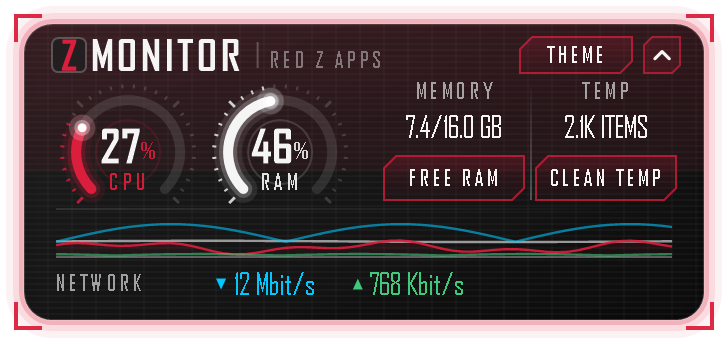
Ring gauges and a 60-second history when expanded, or a slim bar that takes almost no room. Download and upload speed sit alongside them, added together across every adapter that is up. Updated every second.
On many PCs Windows goes through the whole Temp folder at every sign-in, so a folder that has grown for months slows sign-in down. One click clears what has not been touched for six hours, and ZMonitor tidies anything older than a day on its own. Files in use are always left alone.
Hands memory that apps are holding but not using back to Windows. Useful when memory runs short. On a PC with plenty to spare you will not notice a difference.
It starts with Windows as a slim bar and sits above your wallpaper, underneath your apps, so it never covers your work. Move it by its corners and expand it with one click. A Theme button restyles it in twelve colours, from the brand red to navy and darker shades.
Install
Use the Download for Windows button above to save ZMonitor-Setup-1.0.5.zip.
Right-click the zip, choose Extract All, then open ZMonitorSetup.exe.
The installer is not code-signed yet, so Windows SmartScreen may say it protected your PC. Choose More info, then Run anyway. You can check the file against the checksum below first.
Starting with Windows is switched on, alongside a desktop shortcut and launching when setup finishes. Clear any you do not want, then select Install. To remove ZMonitor later, go to Settings, then Apps.
Details
Requirements
ZMonitor runs on the .NET Framework 4.8 that Windows already includes, so there is nothing else to install.
Privacy
No account, no ads and no tracking. ZMonitor only goes online if you click the Z logo, which opens this website.
Installs for you only
Setup installs to your own Programs folder, adds a Start menu shortcut and starts ZMonitor with Windows. Uninstalling removes the app, its shortcuts, its startup entry and its settings.
Verify the download
ZMonitor-Setup-1.0.5.zip
4c0fa2d4749e2694972c845d7fc39f55e3c3b856b71d7b4ddd4eff6de83588b0
ZMonitorSetup.exe, inside the zip
4dbffe2020942daf78c92d0eb6b5a9663aa2ccacfd7876e6f8d005d71af517cf
In PowerShell: Get-FileHash .\ZMonitor-Setup-1.0.5.zip
Feedback
Tell us what happened and which version of Windows you are on. ZMonitor is built and maintained by Red Z Apps.
Email us info@redzapps.comWe reply to every genuine message, usually within two business days.