Downloads › ZSound

ZSound

Windows 10 and 11 · Version 1.0.0 · 158 KB

Louder, clearer sound for everything your PC plays. Presets for movies, music and games, a smart mode that brings voices forward and holds explosions down, and a room tune that measures your speakers with your microphone.

Free · Works with every app · Never distorts, however far you boost

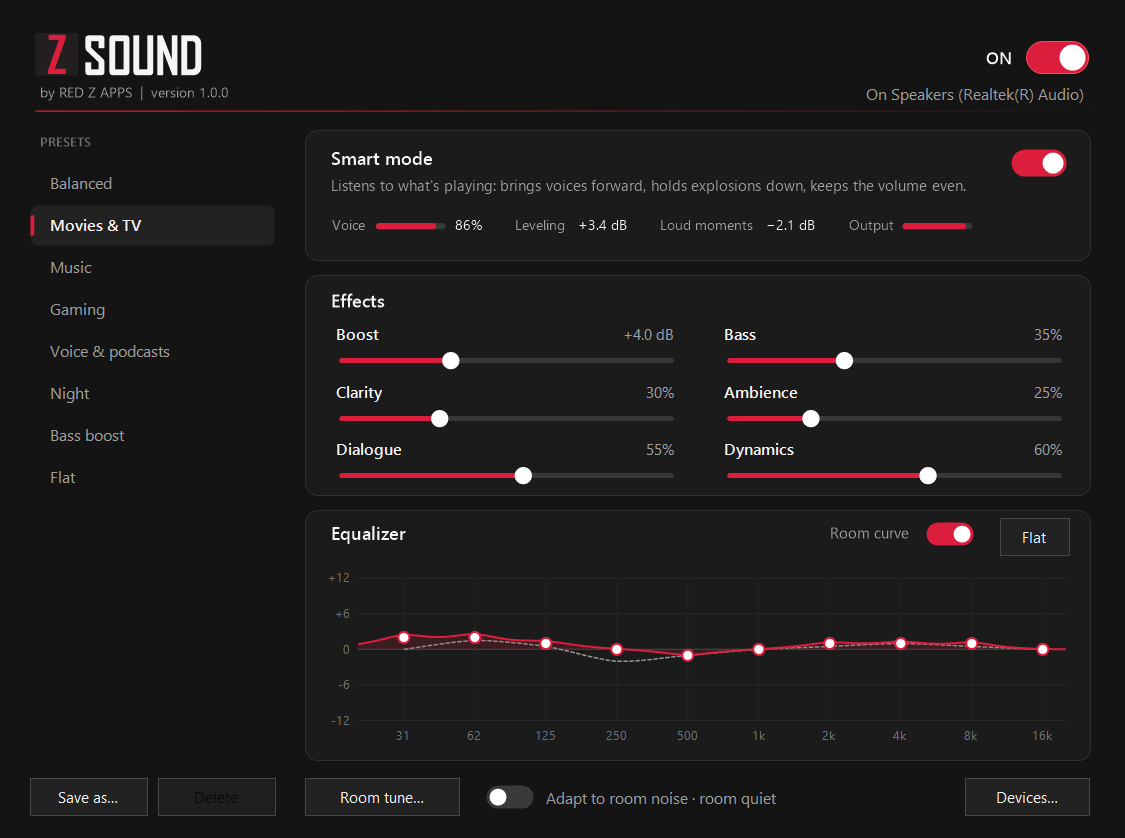
ZSound's window: presets down the left with Movies & TV selected, smart mode reading Voice 86%, sliders for boost, clarity, dialogue, bass, ambience and dynamics, and a 10-band equalizer with the room curve

What it does

Hear the words, keep the walls standing.

01

Smart mode

ZSound listens to what is playing, not just how loud it is. When someone is talking it lifts the voice, which sits in the centre of the mix, and eases the music and effects around it. When an explosion arrives it is held close to the level of the conversation before it, so you stop riding the volume through every film.

02

Boost without distortion

Turn laptop speakers up to 12 dB louder. A look-ahead limiter sits at the very end of the chain and catches every peak 1.5 milliseconds before it happens, so the sound never crackles or clips, whatever the preset and however far the sliders go.

03

Presets, sliders and a real equalizer

Balanced, Movies & TV, Music, Gaming, Voice & podcasts, Night and Bass boost, plus your own. Fine-tune boost, clarity, dialogue, bass, ambience and dynamics, or drag the ten bands of the equalizer — the curve on screen is the filter you actually hear.

04

Tuned to your room

Room tune plays a few seconds of soft noise and listens with your microphone, then evens out what your speakers and your room do to the sound. Turn on Adapt to room noise and ZSound makes speech clearer when a fan, traffic or the kitchen gets loud.

Install

Running in under a minute.

  1. Step 1

    Download the zip

    Use the Download for Windows button above to save ZSound-Setup-1.0.0.zip.

  2. Step 2

    Extract and run the installer

    Right-click the zip, choose Extract All, then open ZSoundSetup.exe.

  3. Step 3

    If Windows shows a warning

    The installer is not code-signed yet, so Windows SmartScreen may say it protected your PC. Choose More info, then Run anyway. You can check the file against the checksum below first.

  4. Step 4

    Allow it, and listen

    Setup asks for administrator rights, because ZSound’s sound engine runs inside Windows Audio. Your sound pauses for a second while Windows Audio restarts, and from then on everything you play goes through ZSound. There is no separate “ZSound” output to pick: keep choosing your usual speakers or headphones. ZSound lives in the tray; to remove it, go to Settings, then Apps.

Details

What you are installing.

Requirements

Windows 10 or 11

ZSound runs on the .NET Framework 4.8 that Windows already includes. Room tune and Adapt to room noise need a microphone; everything else works without one. Apps that take exclusive control of the sound device, such as some professional audio software, bypass ZSound.

How it works

A sound effect inside Windows Audio

ZSound adds itself to each playback device as an audio effect, after the effects your sound driver already has, the same way the open-source Equalizer APO does. Like Equalizer APO, it turns on the Windows setting that lets audio effects not signed by Microsoft load. Uninstalling puts every device, and that setting, back exactly as they were.

Privacy

The microphone only measures

No account, no ads and no tracking. When you use Room tune or Adapt to room noise, ZSound turns what the microphone hears into a few numbers and throws the sound away. Nothing is recorded, saved or sent anywhere.

Verify the download

SHA-256 checksums

ZSound-Setup-1.0.0.zip

e64c1437228fa2083ca19fe7b124cb0bd4d12b2256123b48aa0492d70b61c00f

ZSoundSetup.exe, inside the zip

c0147e63613aba3c9865ecbfc0b6cbc97bf7446686fa8a1a11edcd6a74de3eae

In PowerShell: Get-FileHash .\ZSound-Setup-1.0.0.zip

Feedback

Found a bug or want a feature?

Tell us what happened, which version of Windows you are on, and which speakers or headphones you use. ZSound is built and maintained by Red Z Apps.

Email us info@redzapps.com

We reply to every genuine message, usually within two business days.