Requirements
Windows 10 or 11
ZUninstaller runs on the .NET Framework 4.8 that Windows already includes, so there is nothing else to install.
Downloads › ZUninstaller
Windows 10 and 11 · Version 1.0.1 · 54 KB
Removes a program with its own uninstaller first, forces out whatever refuses to go, and clears up the files and registry entries either one leaves behind.
What it does
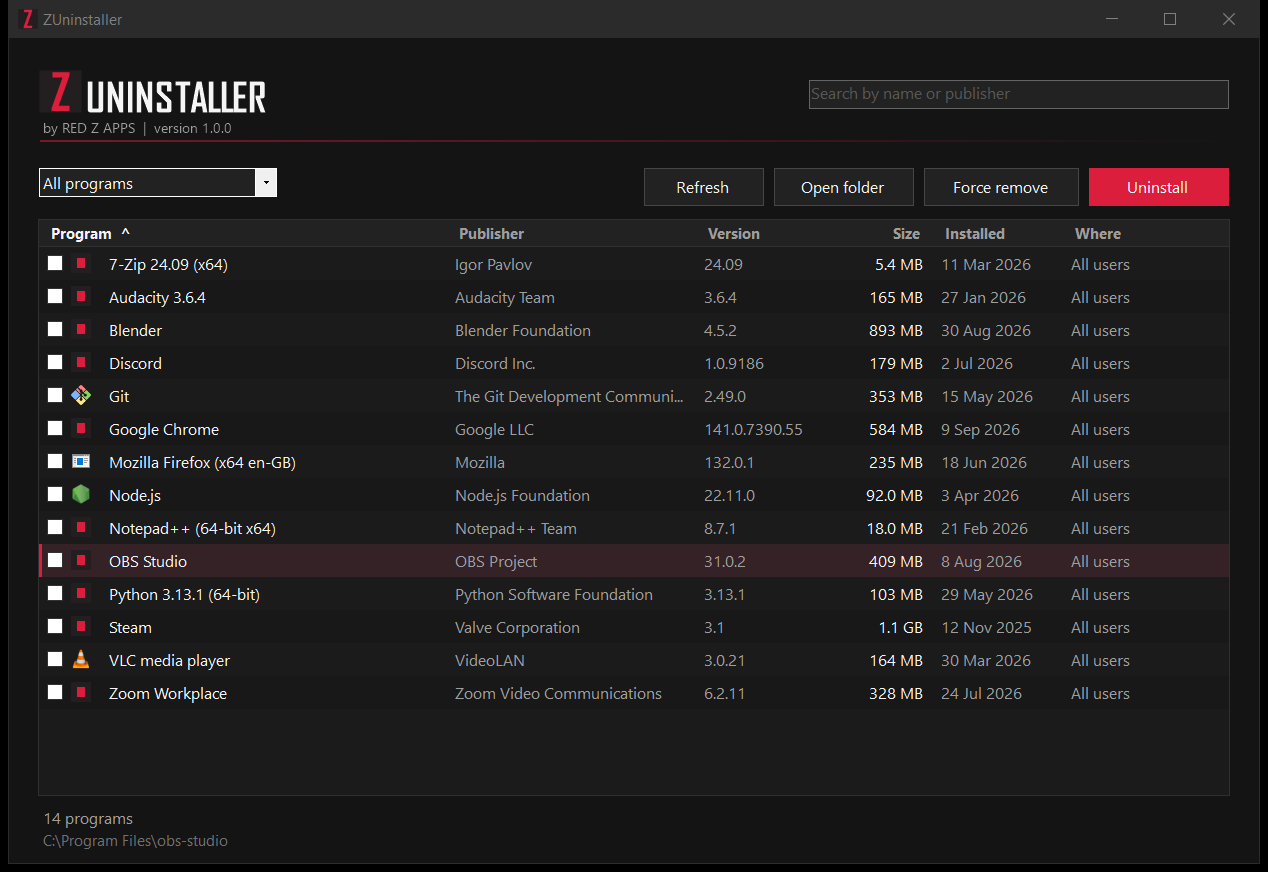
The company that wrote a program knows what it installed — services, drivers, a licence it should release — so ZUninstaller runs their uninstaller before anything else. Then it checks whether Windows still lists the program, rather than believing the exit code, because most uninstallers hand the job to a copy of themselves and exit straight away.
Some programs have no uninstaller recorded at all, and some have one that fails or was cancelled half way. Force remove closes anything still running from the program’s folder, deletes the folder, and takes the entry out of the installed-programs list so it stops haunting Settings.
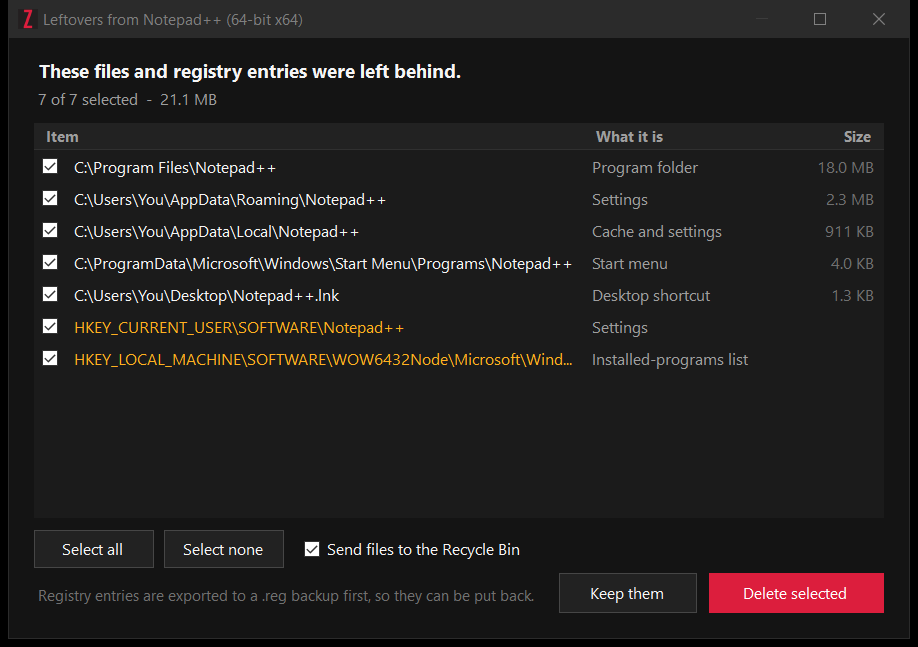
Even a clean uninstall leaves settings, caches and registry keys. ZUninstaller looks through the places programs keep things and shows you a ticked list with sizes. Files go to the Recycle Bin, and every registry entry is exported to a .reg file first — so anything removed can be put back.
Tick as many programs as you want and they are removed one after another. The list covers everything Windows records — installed for you or for everyone, 64-bit and 32-bit — and Microsoft Store apps, which it removes for all users on the PC.
Install
Use the Download for Windows button above to save ZUninstaller-Setup-1.0.1.zip.
Right-click the zip, choose Extract All, then open ZUninstallerSetup.exe.
The installer is not code-signed yet, so Windows SmartScreen may say it protected your PC. Choose More info, then Run anyway. You can check the file against the checksum below first.
Setup needs no administrator rights. ZUninstaller itself asks for them when you open it, because removing a program that was installed for everybody means writing to places only an administrator may touch. Say no and it still lists everything — it just cannot remove anything. To remove ZUninstaller later, go to Settings, then Apps.
Details
Requirements
ZUninstaller runs on the .NET Framework 4.8 that Windows already includes, so there is nothing else to install.
Privacy
No account, no ads and no tracking. What is installed on your computer is nobody else’s business, and ZUninstaller never sends it anywhere.
Nothing goes without a yes
Leftovers are offered as a list you tick, never removed on your behalf. Folders shared with another installed program are left out of that list on purpose, files go to the Recycle Bin, and registry entries are backed up to %LOCALAPPDATA%\ZUninstaller\Backups before they are touched. Uninstalling ZUninstaller keeps those backups.
Verify the download
ZUninstaller-Setup-1.0.1.zip
af044ad570e6d06622d8c6b41e06bc7570b6065da6b9e1a2c52588b7f604cb8c
ZUninstallerSetup.exe, inside the zip
d8752c7d73e49441cd5e8f37cee9a38d337c20f4b4a76afe93bff46eae4be850
In PowerShell: Get-FileHash .\ZUninstaller-Setup-1.0.1.zip
Feedback
Tell us what happened and which version of Windows you are on. ZUninstaller is built and maintained by Red Z Apps.
Email us info@redzapps.comWe reply to every genuine message, usually within two business days.